
Builders Guide
It is important to contact us early!
Once you have your street number, which you should get issued by the city council as soon as you take possession of your land, you can then contact us at the same time as you start engaging other contractors such as your builder and electrician.
We are unable to work with lot numbers.
Homeowner Requirements:
- Get a street number issued by the local council
- Make contact with NGN to find out the specific requirements for your property such as where the NGN fiber is connection is located at the roadside and what else we need to bring the fibre up to the house.
- NGN can feed the house with a nice fast data pipe, but if you dont distribute it around the house correctly, you wont have a very good experience. You will need to decide if you will use your electrician to install the data cabling within the house or if you would like to get a professional data and Wi-Fi tech to install the internal data reticulation.
We are happy to provide advice to your electrician on where to position Wi-Fi base stations or can recommend an installer. Either way we want you have a great experience. - Print and provide this page to the builder and electrician for them to sign. This will give you peace of mind that they will be installing the internal wiring and lead-in duct to the appropriate standard.
Builder and Electrician Requirements:
The construction industry is always a changing environment as it keeps up with the latest technology. You know that building a house today has changed from as little as 10 years ago. New technologies such as low-e windows, materials and processes mean you always need to keep up with the latest trends and regulations.
- Some time ago, we daisy chained telephone outlets around the house
- 15 years ago, home hubs became common – Telephone, TV and Data outlets all have dedicated cables to a central home hub panel.
- 10 years ago fibre began to run direct to the home . It became super important to make sure cabling was up to standard for supporting Wi-Fi base stations closer to the users devices and hard wired devices such as gaming consoles and televisions for the best reliability and speed.
Prior to Construction
- Meet an NGN tech on site with the builder and electrician to work out what is required for the Lead-In cable and where the roadside connection point is. Sometimes it isnt near the electricity source so you will need to know where your trench needs to go.
- NGN will supply some microduct which needs to go into a green 25mm or 32mm duct from the roadside connection point, to the ETP on the outside of the house.
During Construction
- All data outlets around the house must have a Cat5e, Cat6 or Cat6A cable running back to the Home Hub
- The home hub can be a panel in the garage or closet. Part numbers are at the bottom of this page.
- The home hub could be a top shelf in a hallway closet that doesnt get very warm.
- The home hub or data closet should also have coaxial cables running to TVs and the roof for a Sky/Freeview antenna or dish. The best way to receive high definition broadcast TV or Live Events such as sports games is always via Sky or Freeview.
- The home hub or data closet needs at least 4x power outlets
- The home hub panel needs to be at least 600mm tall – anything shorter than 600mm is too small and will not fit the modem, tv coaxial splitters and other electronic components.
Data Outlet Locations
Consider the following data outlet locations around the house and run a cable to them.
Any appliance in the house that requires a data connection, but doesnt move such as smart TVs and music speakers should be hard wired and not using Wi-Fi.
- Lounge TV: 2x data cables and 2x coaxial
- Any other TV: 1x data cable and 1x coaxial behind the tv if mounted on the wall or low on the wall for a cabinet.
- Office: 2x data cables for a desktop computer and printer
- WiFi: Typically you will mount a wifi base station to the ceiling in the hallway and lounge. Smaller houses may only require one Wi-Fi base station, larger houses may require up to 5. See Wifi planning below.
- Kitchen Smart Fridge or other appliances
- Bedroom desk for gaming computers or gaming consoles: 1x data cable
- Smart Appliances such as garden Irrigation controllers etc: 1x data cable
- Solar Inverter: 1x data cable
- Security Camera Recorder: 1x data cable
- Detached Buildings or Sleepouts: 1x data cable and 1x Coaxial cable
Whole Home Wi-Fi Coverage
The days when you could just have one Wi-Fi router in the middle of the house and expect coverage everywhere are gone. Typical homes have many devices connected to the Wi-Fi and with most base stations or routers having a maximum client count of 16, the number of connections is maxed out pretty quickly once you consider all the devices each person uses in addition to smart light bulbs and other IoT devices.
Devices dont need to be actively in-use to use a slot on a base station. A smart light bulb for example could be connected and simply waiting for its next command.
The technical term for a Wi-Fi base station is “Access Point” or “AP”. There is often one built into a router provided by an ISP that provides one wall of coverage. We dont recommend relying on the router provided by the ISP and have a proper set of AP’s or Base Stations positioned correctly throughout the house.
Small Homes less than 80m2
For a small home we recommend one Wi-Fi base station, ceiling mounted in the centre of the house.
That will typically meet our rules below. If the house exceeds 16 Wi-Fi devices, the homeowner can usually add a second Wi-Fi base station one in the home hub or data closet which will allow nearby devices to connect to the second base-station and reduce load on the main central base-station.
For Homes Larger than 80m2 use the following rules:
- A Wi-Fi Base station should be no more than One Wall away in a direct path through walls (not around) from all living positions.
- Consider a living position as the position a device would be in when the user is using it in bed, on a couch, at a desk, or any other position in the home where the device might be used
- You dont necessarily need to place the Wi-Fi base station in the same room. Typically having one in the hallway can cover one or two bedrooms depending upon the floorplan.
- Other low-priority positions such as bathrooms or garages could be two walls away, unless there is an internet connected device in those places – such as an irrigation controller or other smart device.
- An outdoor entertainment area may be blocked by tinted windows. Usually we suggest having a base station in the adjoining lounge to provide coverage to the outdoor area in summer when doors and windows are open.
- Some walls will not allow Wi-Fi to pass through. These include concrete walls, tinted windows, kitchen splashbacks or thick materials such as plaster.
- Consider any other areas that might need coverage such as garages, man-caves, crafts rooms or sleep-outs.
- All Wi-Fi base stations require a dedicated data cable running back to the home hub or data closet. Never use a “Mesh” or “Extender” Wi-Fi system as they slow you down.
- We recommend the Unifi or Grandstream range of Wi-Fi base stations and Access Points.
A Note on Wireless Security Cameras
We absolutley do not recommend running any wireless security cameras. They run on the same radio frequencies as Wi-Fi and will slow down your Wi-Fi speed by causing interference. It is unlikely you will get very good speeds while you have a wireless camera running either in the house or on the same Wi-Fi network.
Each camera should be hard wired with a dedicated Cat5 or Cat6 cable back to the recorder.
The Cable Between the Home Hub and ETP
We use Opticat cable between the home hub / data closet and the external termination point (ETP).
The ETP is where NGN or your internet provider hands over the data to your internal network for you to reticulate around the house.
- The opticat cable should be inside a 20mm or larger duct that has no tight bends. This is to protect it from rodents and make it easy to pull a new cable through if it needs to be replaced in the future.
- There should be enough opticat cable coming out of the wall at the ETP to reach the ground plus one metre.
Likewise there should be enough opticat cable coming out of the wall at the home hub or data closet to reach the floor plus one metre.
The ETP – External Termination Point – and duct to roadside
- NGN will install our ETP box on the outside wall where the opticat cable and its protective duct comes out of the wall
- The electrician or builder will need to bring the duct from the road up to the ETP on the outside wall. It must not rise from the trench inside the wall. If this has not been done correctly, the builder or electrician will be responsible for correcting it.
- The ETP is on the outside wall so it can be accessed while the house is locked or the occupant is not home. Sometimes a technician will need to access the ETP box to locate the cable as it passes out to the roadside when other utilities are digging nearby. There is no option to have the ETP inside the wall.
- If the builder or electrician has not collected or been provided with the microduct from NGN, a pull string MUST be installed in the duct between the roadside and the ETP. If the NGN technician needs to use a duct snake or other tool to install the microduct, charges will apply.
Some Final Notes:
- NGN is happy to provide free advice to any electrician that is pre-installing structured cabling during a house build. We want our customer to have a great experience with their fibre connection.
- Part Numbers for your local electrical wholesaler:
Home Hub Medium 700mm Plastic CDLNZ HWS-2803WRV2
Home Hub Large 1050mm Plastic CDLNZ HWS-4203WRV2
Opticat Cable PRYSMIAN 6337647
Lead In Duct from Roadside Marley SERVD.20.100 20mm green duct 100m roll
Wi-Fi Access Point Base Staton Unfi U6-Lite or Grandstream GWN7605 or GWN7615 or GWN7625
Power supply for each Wifi Access Point Unifi: U-POE-af Grandstream: GSPoE
If using more than 2 Wi-Fi access point base stations we recommend an “8 port POE Switch” which will be tidier in the home hub or data closet and cost about the same.
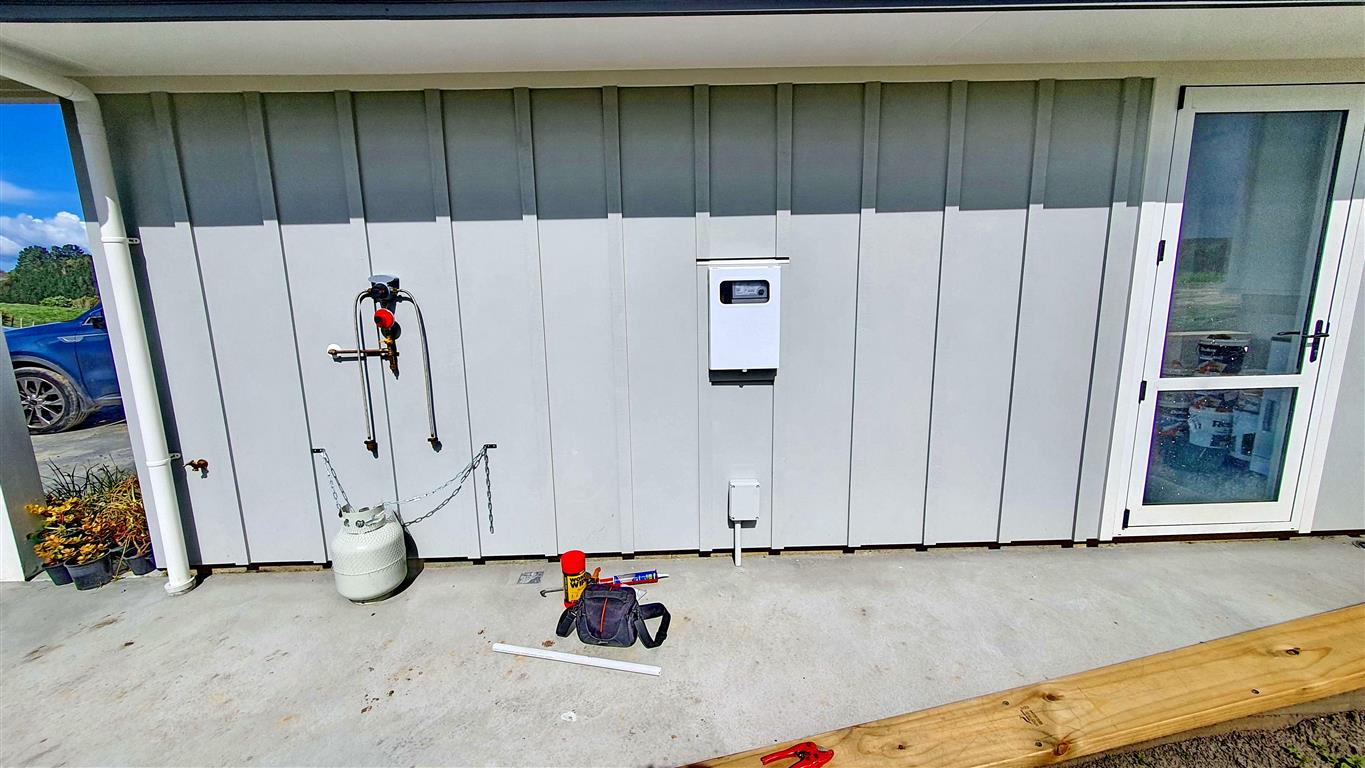
Example 01
A NGN ETP is mounted on the wall below the meter box
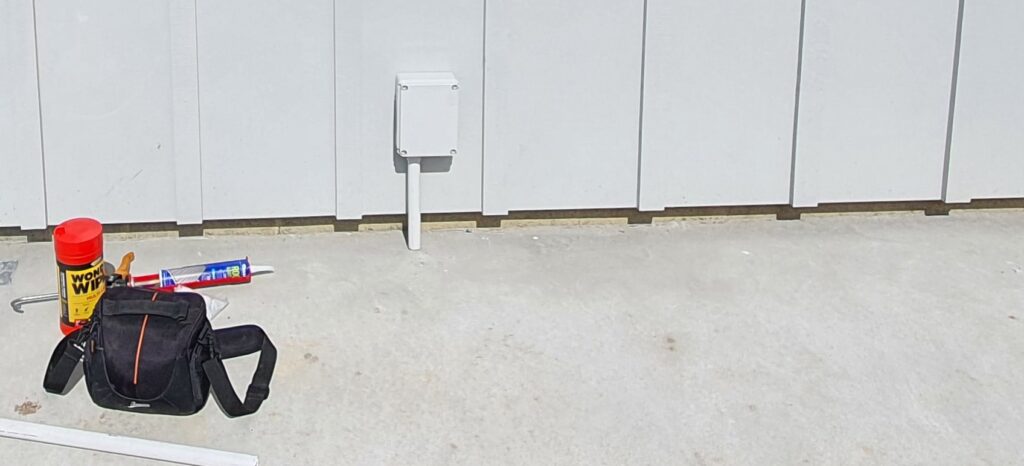
Example 02
A NGN ETP is mounted on the wall below the meter box. A 25mm green duct runs down into the concrete and out to the road.
The NGN tech has covered it with a 32mm white duct to make it look nicer.
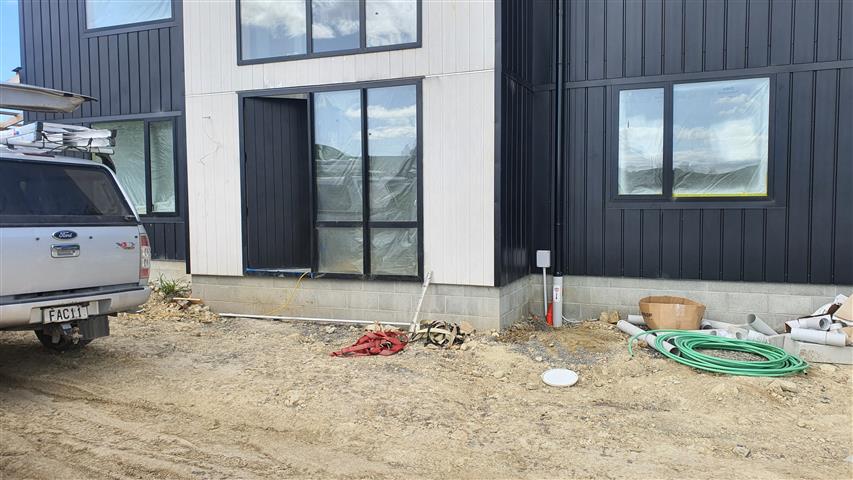
Example 03
A NGN ETP is mounted on the wall balanced between the closest point on the house to the roadside pillar, and being positioned in an aesthetically pleasing location, while the lead-in duct has no more than 180 degrees of bends.
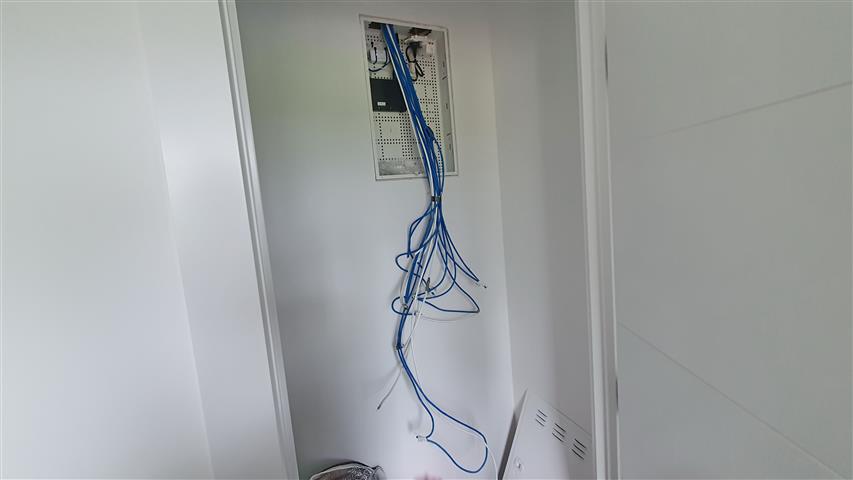
Example 04
There is enough opticat cable left in the home hub media closet to reach the floor plus one metre.
The electrician has done the same at the external end.
Between these two points, the opticat is in a 20mm duct from the ETP to a point where there is adequate crawl space in the attic or all the way to the homehub if there is no attic space – with wide sweeping bends along the way.

Example 05
The electrician has used a home hub which is too small to fit all the required devices for televisions and data, and the cables cannot be routed in a tidy fashion.
We advise using at least a 700mm tall home hub, or allocating a shelf in a ‘media closet’ in the centre of the house so there is space for all the equipment.

Example 06
To protect against rodents, the opticat between the ETP and the homehub/media closet must be inside a 20mm or larger duct and pull freely. The duct may end where there is adequate space without any uncomfortable reaching or crawling in the attic. This is so our techs can replace the cable if needed in the future.